Chapter 5 of 8
Web GIS
Sharing maps online, story maps, and where web GIS fits alongside the desktop.
The internet has revolutionised GIS. It's no longer too expensive, too complicated, or too isolated: you can build an engaging, interactive web map in minutes and share it with anyone, anywhere, on any device.
We always knew GIS was powerful, and we always had our excuses for not using it:
- We can't afford GIS.
- It's too complicated to set up.
- Our users can't learn a GIS map.
- Our team is too distributed.
- We work in the field, not a GIS lab.
One by one, web GIS has demolished every one of those objections. You can now stand up an easy-to-use, mobile-ready web map and share it across your organisation in an afternoon, for less than your office coffee bill.
But functionality is only half the story. The bigger shift is the democratisation of data.
In ancient times, purple was the colour of royalty. The dye took thousands of shellfish to produce a single gram, so only emperors and queens could afford it. Then, in 1856, an 18-year-old chemistry student named William Perkin accidentally invented the first synthetic dye, and suddenly ordinary people could wear a colour once reserved for the powerful.
Data is the new purple.
Web GIS doesn't try to outperform the desktop, and it isn't competing with it. Its job is to put the power of GIS in everyone's hands. Watching a pro visualise data in a desktop GIS is cool. Watching Susan in sales (no training, just her browser) find every non-client household in her territory in a zip code with average income above $250k and a median age of 35 to 45… that's mind-blowing.
Your job when building a web GIS is to make something so focused and refined that it explains itself. No training, no arm-twisting: the benefit is so obvious that people wonder how they ever worked without it.
The scalpel vs. the Swiss Army knife
Early web maps tried hard to replicate the look, feel, and complexity of desktop GIS. It brings to mind a line often attributed to Henry Ford:
If I had asked people what they wanted, they would have said faster horses.
It took the industry a while to realise we needed less, not more. The nudge came from outside GIS: Google. Google Maps isn't a traditional GIS, but it was so simple that within weeks everyone from preschoolers to grandparents was navigating the world in a browser. The whole industry face-palmed and said, "Of course."
Since then, best practice has moved away from web maps that do everything, towards story maps. A story map is laser-focused on one question or workflow. "But our users have lots of questions," you say. Then build lots of maps.
Story maps
If a map is worth making, its data carries a message worth sharing. A story map exists to tell that story as clearly as possible, so the reader leaves in no doubt about what the data says, and feels they've learned something.
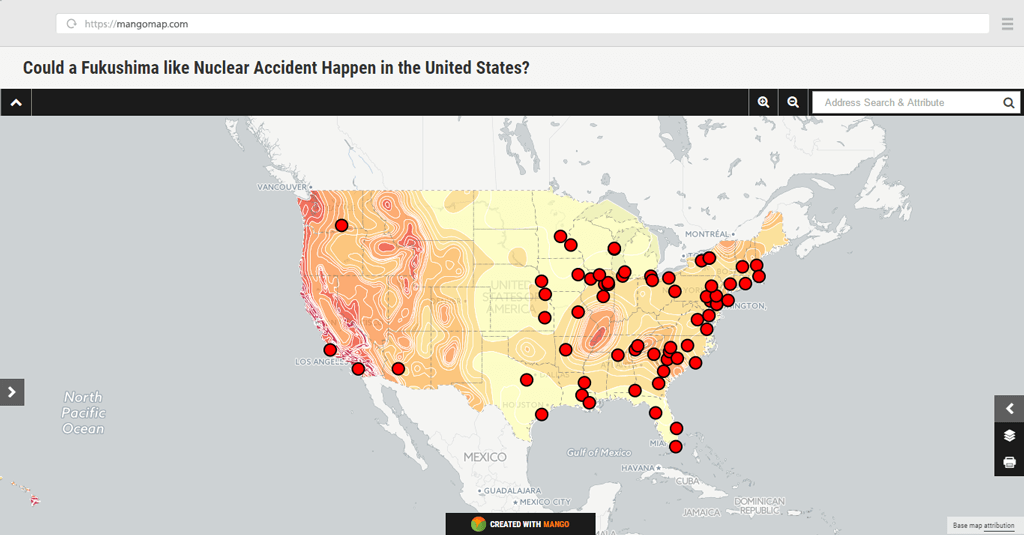
The map above is a great example. The moment it loads, a big headline poses the question, "Could a Fukushima-like nuclear accident happen in the United States?", so you know exactly what you're looking at. It uses rich colours and bold red markers for the nuclear facilities. If you're used to subdued desktop palettes and cross-hatched fills, high-impact web styling takes some getting used to. But the audience has changed along with the medium. The web is a land of constant distraction and short attention spans; your map has to engage from the first second.
The legend has just two layers: nuclear facilities and seismic hazard. It could have added every individual earthquake, but would that have strengthened the story or just distracted from it? With story maps, less is more.
How a web map actually works
A simple mental model of what happens when a web map loads will serve you well. A web map is usually assembled from several pieces: a basemap, one or more data layers, styling rules, popups, some controls, and permissions that decide who can see it.
The browser doesn't download one giant map image; it requests small pieces, called tiles, as you pan and zoom.
There are two kinds of tile, and the difference matters once your maps get bigger:
| Tile type | Simple explanation | Good for |
|---|---|---|
| Raster tiles | Small map images | Satellite imagery, simple basemaps |
| Vector tiles | Small packets of geometry and attributes | Fast, styleable interactive maps |
Why is my map slow?
Sooner or later you'll publish a map that feels sluggish. It's almost always one of these:
- Too many features, or very detailed geometry
- Large file sizes, or too many layers switched on at once
- Thousands of unclustered points
- Heavy, image-laden popups
- Large, untiled rasters
The fixes are just as predictable:
- Simplify overly detailed geometry
- Cluster dense points
- Use vector tiles for large vector datasets, and Cloud Optimized GeoTIFFs (or tiled rasters) for large imagery
- Filter the data down before publishing
- Limit how many layers are shown by default
- Keep popup content lean
Sharing, permissions, and embedding
Publishing is only useful if the right people can actually reach the map. Most web GIS gives you a spread of options:
- Public maps anyone can open
- Private maps limited to your team
- Password-protected or hidden-link maps for a middle ground
- Embedding a map directly into your own website or intranet
- Mobile-responsive layouts so it works on a phone as well as a desktop
- Permissions and roles that control who can view versus edit
- Keeping shared maps up to date automatically when the underlying data changes
Dashboards and modern web GIS
Web maps rarely travel alone any more. It's increasingly common to surround a map with other elements to tell a fuller story:
- A map paired with charts or KPI cards
- Time filters to step through change
- Real-time vehicle or sensor feeds
- Public transparency dashboards and planning consultation maps
- Collaborative editing across a team
You don't need any of this for your first map, but it's where web GIS is heading, and good to have on your radar.
Will web GIS replace desktop GIS?
Short answer: no, not any time soon. The two are complementary and symbiotic. Desktop GIS is to web GIS what a word processor is to a blog: brilliant at creating and manipulating data, useless at distributing it. The popular workflow is to do the heavy lifting on the desktop, then publish the finished result as a web GIS so the maps reach the people who need them.
Nearly there
And there it is. You now know what GIS is, how maps are styled from data, the formats that data comes in, the software that works with it, and why the web changed everything. You've got the vocabulary to talk GIS with confidence and a clear picture of how the pieces fit together.
Before you build your own map, there's one short but valuable detour: the handful of classic mistakes that trip up almost every beginner. Knowing them now will save you from a map that looks great but quietly misleads its readers.
Ready to make your first map?
Everything in this guide, put to work: upload your data and publish an interactive map in an afternoon. No credit card required.